

Introduction Of Weighing Scale With Barcode Printer
In industrial and commercial weighing operations, capturing accurate weight data isn’t just a technical task — it’s a business necessity. Whether you’re packaging raw materials, dispatching finished goods, or managing inventory, understanding the Tare, Net, and Gross weight is essential. This becomes even more critical when using a weighing scale with barcode printer — a system that automatically prints labels with weight data and eliminates manual entry errors.
This article explains why Tare, Net, and Gross weight are not just technical terms, but key components of traceability, compliance, and operational efficiency in industries that rely on precise weight management
What Are Tare, Net, and Gross Weight?
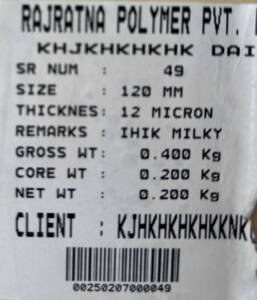
Before diving into why they matter, let’s define the basics:
Gross Weight: The total weight of the product, including the container or packaging.
Tare Weight: The weight of the empty container, box, bag, or any packaging material.
Net Weight: The actual weight of the product without the packaging, calculated as:
Net = Gross - Tare
Understanding these three values is critical for correct billing, packaging, labeling, and inventory control.
The Importance of Accurate Weight in Industrial Operations
Accuracy in weight calculations helps:
Avoid under-packing or over-packing
Ensure correct customer billing
Comply with legal-for-trade requirements
Reduce product loss or packaging material wastage
Enable better inventory forecasting
Now imagine these values being printed instantly on a label using a weighing machine with label printer — without any manual calculation or data entry. This eliminates the scope for human error and ensures real-time traceability.
How Weighing Scales with barcode Printers Handle Tare, Net, and Gross Weight
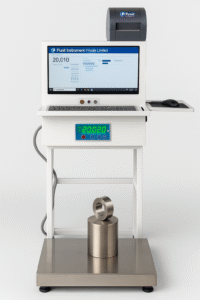
A weighing scale with barcode printer typically operates in this sequence:
Tare Function: The user places an empty container on the scale, and the system captures its tare weight.
Weighing the Product: The product is added to the container, and the system calculates the gross weight.
Automatic Net Calculation: The scale automatically subtracts the tare from the gross to derive net weight.
Label Printing: A label with the following is printed instantly:
Net weight
Tare weight
Gross weight
Product name or batch ID
Date & time
QR code or barcode (if needed)
This label can then be stuck on the product or packaging for identification, compliance, and tracking.
See Product Details –
Label Printing Scale with QR Code – Print Tare Weight , Net Weight , Gross Weight In Labels & Generate Dispatch / Packing Slips.
Why Is the Tare Feature Crucial in Label Printing Scales?
In many industries, the packaging materials vary in weight. Even if you’re filling the same quantity of product, the tare weight can differ between units. Relying on pre-set weights or estimations leads to inaccurate data.
With an automatic tare function, the system ensures each unit is weighed individually with the correct tare. This improves consistency across batches and prevents disputes during dispatch or audits.
Benefits of Using Tare, Net, and Gross Weight in Label Printing
1. Improved Accuracy and Elimination of Manual Errors
Traditional weighing relies on operators reading values and writing them manually. This leads to inconsistent labeling, data loss, and even fraud. Automated weighing and printing improve data precision.
2. Faster Operations
The speed at which labels are printed saves considerable time in high-volume packaging or dispatch environments. Operators don’t need to input data or use separate printers.
3. Compliance with Legal and Export Standards
For industries involved in exports, clear mention of net and gross weight is often a regulatory requirement. Label printing scales help meet such standards easily.
4. Integrated Inventory and Dispatch
Modern scales can sync with your ERP or warehouse management system. This allows live tracking of products based on real-time weight data.
Industries Where It Matters the Most
Food & Beverage: Net quantity must be accurate and declared on each pack.
Chemicals & Fertilizers: Bulk bags require gross/net data for transport compliance.
Agriculture: Weight-based payouts for produce like grains, coffee, tea, etc.
Logistics & Warehousing: Dispatch slips and packaging labels rely on clear weight data.
Retail Packaging: Ensuring the end-user gets the exact product weight advertised.
How Label Printing Scales Ensure Consistency Across Batches
Let’s say you’re dispatching 500 boxes of a product. With a digital weighing scale for packaging that includes automatic tare and label printing:
Each box has a unique label with net weight
You ensure the end-user receives the promised quantity
You have proof of weight for each item in your system
You can quickly detect and investigate any claims of weight discrepancies
Without this system, you’re relying on human precision, which rarely scales.
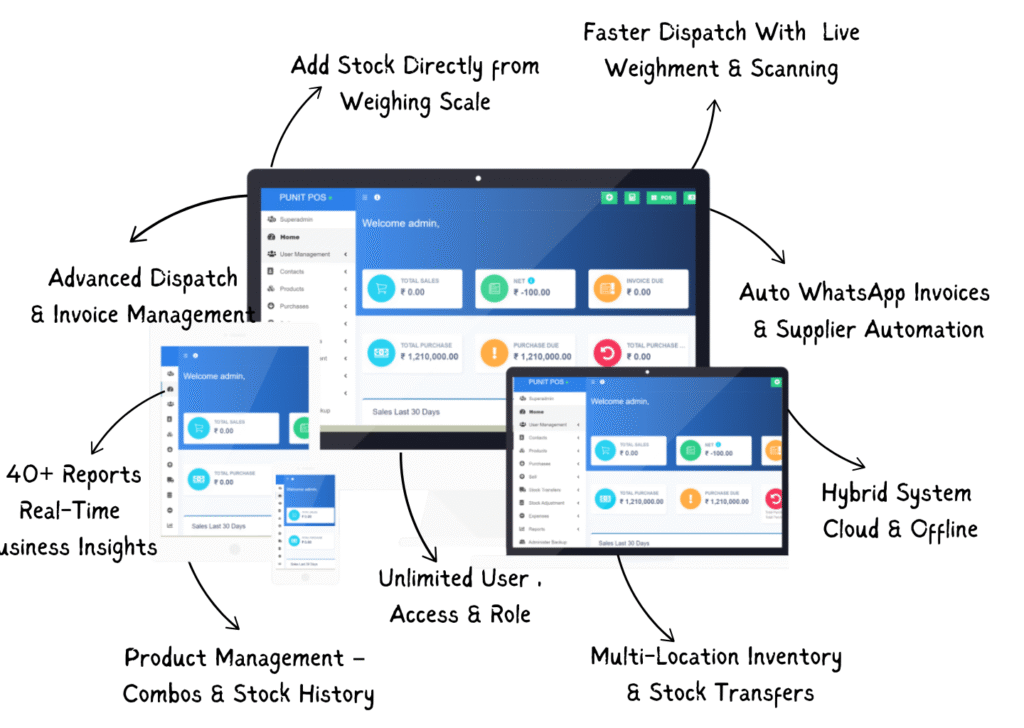
Integration with ERP and Barcode Systems
Modern weighing machines with label printers can print QR codes or barcodes with tare/net/gross weight embedded. This enables:
Quick scanning at dispatch
Real-time inventory updates
Digital traceability of every unit
Automated reports generation
When integrated into your operations, this becomes a strong foundation for digital transformation and smart warehousing.
Conclusion
Tare, net, and gross weight are far more than just numbers. In industries where weight determines cost, quantity, and compliance — they are foundational metrics. Using a weighing scale with barcode printer automates these readings, ensures accuracy, eliminates human error, and brings transparency across your operations.
Whether you’re handling food, chemicals, fabrics, or any material sold by weight — having a system that prints accurate labels with tare, net, and gross values is no longer optional. It’s essential.